A board, not a breadboard
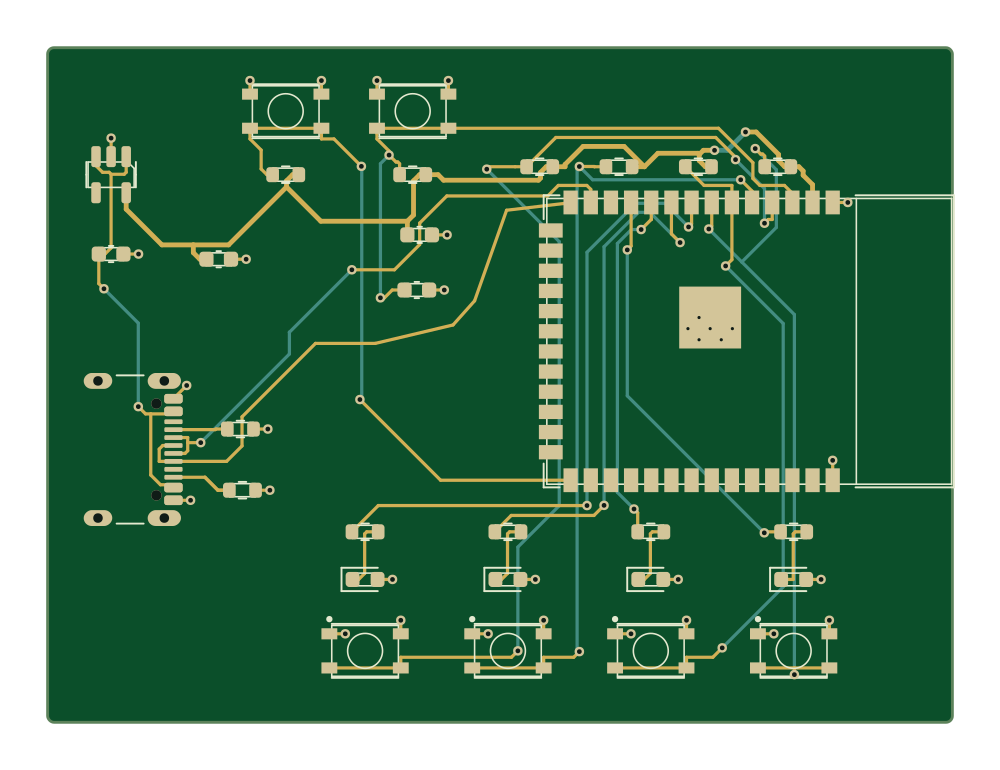
siliXon lays out a custom PCB instead of wiring modules to a development board.

 Try siliXon
Schematik is great at telling you which jumper wire goes where on your Arduino, ESP32 or Pico, and it will even write and flash the code. What you end up with, though, is a development board, a breadboard and a tangle of wires, not a PCB you can put in a product. siliXon designs the actual custom circuit board: it picks real parts, draws the schematic, places and routes the layout and hands you Gerbers, drill files, a BOM and pick-and-place data, ready to send to a fab.
Free plan. Runs in your browser.
Who leads on what matters when you want a board.


siliXon: A plain-English description
Schematik: A plain-English description
Even.siliXon: None
Schematik: None; you assemble the build
Even.siliXon: siliXon; you steer and edit
Schematik: Its AI writes code and wiring; you build it
siliXon leads.siliXon: An editable PCB and fab files
Schematik: Code, wiring and a parts list
siliXon leads.siliXon: Minutes
Schematik: No custom PCB
siliXon leads.siliXon: Up to 4 layers
Schematik: Development boards and modules
siliXon leads.siliXon: None
Schematik: No PCB to lay out
siliXon leads.Verdict
Choose siliXon to design a custom board you can send to a fab.
Choose Schematik to get code and wiring for an Arduino, ESP32 or Pico build.
siliXon todaysiliXon is in early beta and builds two- and four-layer, mostly digital boards. Review every design before fabrication.
Where Schematik is strongerIt writes and deploys Arduino-compatible code, and supports the development boards most makers already own.
Time to a prototype
From an idea to a board you can send to a fab, on one scale from zero. Estimates for someone new to each tool.
siliXon lays out a custom PCB instead of wiring modules to a development board.
Download Gerbers, drill files, a BOM and pick-and-place data to order the board.
Connectivity and manufacturing checks run on the real parts you will buy.
| Feature | | |
|---|---|---|
| Starting point | A plain-English description | A plain-English description |
| AI generation | Generates the whole board | Code, wiring and a parts list |
| PCB layout | Editable in 2D and 3D | No |
| Copper layers | Up to 4 | No PCB |
| Part selection | Real, available parts picked for you | Component list with quantities |
| Design checks | Connectivity and manufacturing checks | Pin assignment tables |
| Fab outputs | Gerbers, drill, BOM and pick-and-place | No |
| Firmware | Programmable over USB, with flashing steps | Arduino-compatible code, deployed to the board |
| Layout prep | None; answer a few questions | No PCB layout |
| Runs in | Browser | Browser and desktop app |
siliXon is in early beta and builds two- and four-layer, mostly digital boards. Review every design before fabrication.
So far creating my first project for 10 min - onboarding seems quite smooth
I like the self validation and how it explains everything too, makes it easier for me to quickly cross reference and learn on the go
Response is very meaningful, I like how it asks you questions to verify and gives you the options to choose the answers with the recommended on the one it thinks is a better option
Good so far. It is helpful and gives me advice
I have to say I love the UI and UX, the front end is really fun to interact with, with the little dynamic touches etc
Super helpful and easy to use
Really good actually better than Flux ai
 siliXon vs KiCadFree, open-source desktop EDA for schematics and PCB layout
 siliXon vs Altium DesignerProfessional EDA for complex, multi-layer production boards
 siliXon vs Blueprint.ioAI build plans with parts, wiring and assembly steps
 siliXon vs Flux.aiBrowser ECAD with an AI agent that designs alongside you
 siliXon vs DiodeAI-assisted board design service, from spec to production
 siliXon vs QuilterAI placement and routing from your finished schematic
 siliXon vs SnapMagicAI copilot for Altium, built on the SnapEDA parts library
 siliXon vs CELUSAI that turns requirements into schematics and a BOM
 siliXon vs atopileCode-native electronics design, with an agent in the browser
 siliXon vs tscircuitOpen-source framework for designing PCBs in TypeScript
Schematik builds projects around development boards: code, wiring, parts and assembly steps. siliXon designs a custom PCB and exports fab files.
Its public site does not describe PCB layout or fab files. It focuses on Arduino, ESP32 and Raspberry Pi Pico builds.
siliXon designs boards you can program over USB and gives you the flashing steps. Schematik also writes the code.
Yes. Prototype with a development board in Schematik, then design the custom board in siliXon.